Showing posts with label Android tricks. Show all posts

How To send Fack Thumbnail MSG in Whatsapp (Whatsapp me Fack Thumbnail Kese Send Kare?)

Whatsapp me Fack Thumbnail Kese Send Kare?

Agar aap apne Dosto ke sath Kuch Majak karna chahte ho to Ye Ek Acchi Trick he. Dosto aapne Whatsapp me kay bar dekha hoga ki  Jab Koy aapko Image Send Karta he To Uski Thumbnail Image Kuch Or Hoti he Or Download karne ke bad Vo Image Kuch Or hi nikalti he.


Jyadatar Thumbnail me Koy Sexy Si Ladki ki image hoti he Or Jab aap Use Download karte ho to Kuch Bad Words  likhe hote he. Aaj ham aapko bataya ge ki is tarah ki Image kese banate He?

Follow This Steps :-

1). z photofake application Download kare , install kar ke open kare.

2). Ab aapke samne Pic Select karne ke 2 Option Aaye ge 1)camera 2) gallery. Aapke hisab se image Choose kare or next Button Pe click kare.Ye image Whatsappke thumbnail me rahe gi. Matlab jab aap kisi ko ye image send karo ge to User koy ye vali image dikhe gi.

3). Ab Phir se aapko Image select karne ka Option Show hota hoga Ab wo image select kare jo User ko Image download karne ke bad aap dikha na chahte ho, Image select karne ke bad Next Button Pe Click karde.


4). Ab Send Name ka ek button Enable Ho jayega , Uspe Click Kijye Or Whatsapp Select kijye , Or Aap jaha pe jisko Send karna chahte ho use send kardijye.

Dosto Ummid he aapko hamari Post pasand aayi hogi, Agar aap Technology Me Interest rakhte ho to Niche diye gaye Subscription Box me aapna Mail Id Dal De Isse Hoga ye ki Jab Bhi ham New Post kare ge aapko turant mail miljaye ga.

How To Download Whatsapp Status - Whatsapp Status download kese kare?

 Whatsapp Status download kese kare?


Hellow Dosto , Aap sab log Whatsapp to Use karte hi hoge , To aaj Ham bat karege Whatsapp Sattus Download Kese Kare? Ji ha Dosto Whatsapp ne apna naya Fetcher jab se launch kiya he aap dekhte hoge ki aapke dost status me Image , Video , Text Rakhte he. In mese kuch ese hote ho aapko bahot hi pasand aajate he , Pa dikkat ye he ki aap Use Download nai kar sakte.

To ab aapko chinta karne ki koy zarurat nai he, aaj ham aapko batayege ki How t Download Whatsapp status.To chalye start karte he.

#story #storyline #status #whatsapp #whatsappstatus #download #downloadstatus

How to Download Whatapp Staus ?


1) Play Store me jaye or Status Saver Name ka Application Download kare.


2)Status saver App ko download karke Install karlijye Or Use Launch Kijye.

3)Aapke samne Home Screen aayegi , usme aapne jinke bhi whatsapp Status dekhe he uske Status hoge. Or Jo Status aap dekhoge vo add ho jayege.


4) Ab aapko niche ek + Sign ke Button pe click karna he.


5) Aapke samne 4 Option  Show Hoge 

  • Save
  • Repost
  • Set As
  • Delete

6) In Sab Mese Sabse Pahla Option Save Pe Click Kijye. Save Pe click karte hi Status Save Ho jayega.

To Ese Aap Save karskte he Image Status , To ab aap soch rahe Hoge Ki Video Status kese save kare To ye bhi Ham bata dete he.

Application Ke home Screen pe Top me Aapko Do option Dikhe rahe hoge Images , Videos In mese Video Select Karlijye.


Ab Jo bhi video Download karna he vo select kijye Or Image save karte vakt jese  + Sign Pe click kiya tha  wese hi Kare. Or Phir Save Pe Click kijye ese karnese Aapka video ststus save ho jayega.


Two Whatsapp In One Mobile - Paralles Space

1 Mobile Me 2 Whatsaap 2 Twitter,  2 Facebook Kaise Use Kare. 


Sabse pahle me aapko batadu ye mera  pahla post he. Aapko ek mobile me do id use karne ke liye ek softwar downlod karna hoga. 
Niche diye gaye steps ko follow kare. 

STEP 1:-  Aapke mobile mese play store me jake  'paralles space' downlod kare.  or use install karle.Ya fir yaha click kare.  


STEP 2:- Ab us app ko open kare
STEP 3:- Use me dowen to screen aapko plus(+) sign dikhe ga uspar click kare. 
STEP 4:- Usme aapko do type ke  opction milege ek hoga hot app or ek more app un dono me aapke mobile ke installed aap hoge uspar click kijye or ab aap ek phon me fb whats aap ya kuch bhi do use kar sakte be. 

Kisi bhi website ko Internet ke bina kese open kare


Hellow Dosto.....

                     Me ek bar phirse aagaya hu ek nayi tricks leke , Is bar ki tricks he "Kisi bhi website ko Internet ke bina kese open kare".

Friends ye koy appril full ya majak nahi he ye bilkul sach bat he jo me aaj aapko Shair karna chahta hu.To chaliye ab start karte he ke ham kese Kisi bhi website ko Internet ke bina kese open kar sakte he.

Ybhi padhe:pattern lock ko hack karke kese tode

Dosto iske liye aapko Ek softwar downlod karna hog Shirf ek softwar ki madad se aap Kisi bhi website ko Internet ke bina Open karsakte ho, to aayiye jante he us behtarin softwarke bare me.

Sabse pehle to aap ye softwar downlod karlijye, ye softwar ka name he  Offline Browser,
IS softwar ko downlod karne keliye yaha Click kare : Offline Browser .

ye bhi padhe : whats-app-font-trick

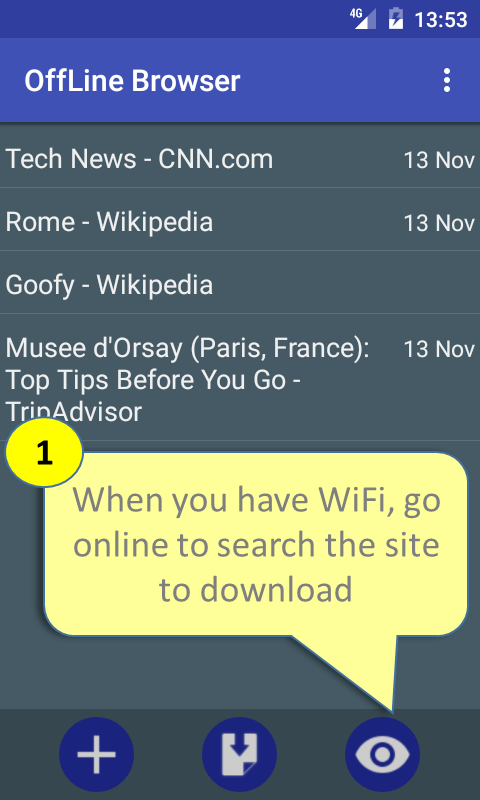
Ab is images ko follow kare.


   Offline Browser- screenshot


   Offline Browser- screenshot


   Offline Browser- screenshot


   Offline Browser- screenshot


   Offline Browser- screenshot


   Offline Browser- screenshot

   Offline Browser- screenshot

   Offline Browser- screenshot


   Offline Browser- screenshot

   Offline Browser- screenshot


Whats app Font trick


 Hellow Friends , 

                   Whats app ek bahot hi popular aap he jo ke aapna app update karta rehta he. Whats app apne har naye update pe kuch naye features deti he.

                   Un features me se kuch ese features he jo bahut kam log jante he , jese ki font change karna ya fhir Bold Style ya fhir talic  Style or bhi kay......To in mese kuch me aapko batvunga.


WhatsApp me font ko change kese kare ?


whatsApp me bhi app font ko change karsakte ho , Appko whatsApp me font ko change karne keliye words ke aage ``` or piche``` likhna he. jisse aapke font change ho jayenge.

jese ki yaha hame "Forex Trading Platform "    is ke font change karne he to hame ```Forex Trading Platform```aese likhna hoga. is se aapke font change ho jayenge bilkul ese.


WhatsApp me font ko Bold kese kare ?


WhatsApp me font ko bold karne ke liye aapko jis word ko bold karna he uske aage aapko * or piche * Sign lagana hoga,

jese ki hame "Online Stock Trading" is word ko Bold me likhna he to hame is kuch ese likhna hoga, *Online Stock Trading* os seye word Bold  me ho jayega.

WhatsApp me font ko Italic kese kare ?


WhatsApp me font ko italic karne ke liye aapko Same Bold vali tricks hi use karni he bas aap jisbhi Word ko Italic  me karna chahte ho uske aage _ or uske piche _ sign laga na hoga.

Jese ki muje "Health Records, Personal Health Record" is Word ko Italic  me karna he to muje is kuch ese likhna hoga _Health Records, Personal Health Recordis se ye Italic  me show hoga.

WhatsApp me font ko Strikethrough kese kare ?


WhatsApp me font ko Strike through  karne ke liye aapko jis Word ko Strike through  karna he uake aage ~ or uske piche ~ Sign lagani hogi usse vo word Strike through ho jayega.

jeseki muje"Auto Mobile Shipping Quote" is word ko Strike through  me likhna he to muje is kuch is tarah likhna hoga ~Auto Mobile Shipping Quote~ is se ye word through   ho jayega.
To dosto ummid he ki aapko post pasand aayi hogi agar aap esi jankari chahte ho to hae Subscrib bhi kar sakte he.

Jay Swaminarayan...........

Pattern lock ko hack karke kese tode

Image result for Pattern lock ko hack karke kaise tode

Pattern lock ko hack karke kese tode !?


Hellow dosto me krupal korat phirse aagaya hu ek nayi trick ke sath , aaj me aapko batavunga ki Pattern lock ko hack karke kese tode?

ji ha aap ne sahi padha he ab aapbhi kisi ki pattern lock ko hack karsakte he.

Mere kai dosto ne mujse ye pucha ki Pattern lock ko hack karke kese tode is liye me ne ye post kari he taki aap sab logo ko bhi pata chal sake ki Pattern lock ko hack karke kese tode?

Mesothelioma Law Firm

To ab dhyan se padhe me aapko batane ja raha hu ki kese Pattern lock ko hack karke kese tode?

Step No. 1-
Sabse pahle aap apna mobile switch off kardijye or use thodi derke liye switchoff hi rehne de.

Step No. 2-
Ab Up Volume Button, Home Screen & Power Button ko  30 seconds ke liye  dabakar rakhe.
Step No. 3-
Ab aapke samne 5 Option honge.
1) Reboot data
2) Wipe Data/ Factory reset
3) Install update
4) Power down
5) Advanced options
Ab usmese Wipe Data/ factory reset option Select kare.
Step No. 4-
Wipe Data / factory reset option select karne ke bad OK button dabaye.

Note 

            Ye Steps ko follow karne ke bad aapke smartphone ke sare data Delete hojayenge , To Soch samajke iska istamal kare.


Step No. 5-
step 4 khatam hone ke bad ye thoda samay lega or uske bad phon restart hojayega or aapke hath me unlok phon hoga.

To ab aapko ye trick aagayi he koy bhi question hoto comment boxme puch sakte ho.
Mesothelioma Law Firm
JaySwaminarayan...........

MX Player me Audio OR mp3 kese play kare

MX Player me Audio OR mp3 file kese play kare


  • Hellow Dosto me krupal korat aapke liye laya hu ek or trick MX playes trick, jyadatar logo ke lagta he ki MX player me shirf videos hi open hote he, lekin vo galat he MX player me aap Audio file bhi play karsakte he.
  • Ji ha dosto sahi suna aapne aap MX player me audio file play kar saktehe , aaj me aapko yehi sikavunga.

NOTE : - 

                   shayad kay logo ko lagta hoga ki ye kya bakvas karraha he ye to sabko pata he , par nahi dosto aap galat ho mene kay logose pucha jo ki android phone use karte he par uske bare me jyyadatar informaction use patahi nahi hoti to ye post unlogo ke liye he,

                  agar aap pehle se hi ye trick jante he to Well!! and Good..........


To dosto ready ho jayiye me aapko batane vala hu ki kese MX Player me Audio OR mp3 kese play kare.

Step : 1

Sabse pehle mx player ko open kare.(images dekhte jaye)

Ab aapke samne ye screen aayegi.


Step : 2

uppar kone me jo 3 dots he vaha pe click kijye.

is me aapko kay sari opction dikhay dengi.

Step :  3

Ab is mese jo last ke uppar vala opction he "Settings" vo select kare.


Yaha pe aapko Audio name ke button par click karne he.


Step :  4

jese hi aap Audio button par click karenge  aap  ke  samne ye screen aayegi.

Step :  5

Ab aapko Audio player vala opction Check karna he.
bilkul ese.

Ab aap phir se main screen me aayenge or kone me jo refresh pe click karenge to aap ko audio file bhi show karengi.
To bilkul ese aap mx player me audio file play kar sakte ho.


Dosto ummid he aap ko ye post pasand aayegi..

Jay swaminarayan...........................

Deleted images ki recovery kese kare ANDROID or IPHON ( How to recover deleted photos from your iPhone or Android)


Aaj kal kai log images ki bhi collection karte he log kai jagahose i mages leke collection karte he or esa collection karneme bahot hi jyada mehnat lagti he.

Lekin jab koy bhi pic galti se delete hojati he tab bahot hi dukh hota he but Thanks to technology,
Technology ki madad se ab aap kisi bhi chiz ko recover kar sakte he.

To ab jante he ki image ko kese recover kate.
To is keliye muje 2 os ke bare me pata he ek to apne ANDROID OS  or dusra IOS(I phon).

Android : -


   Android market me ese kai app he jo aapko i mag recovery me help karte he, ab un sabmese konsa accha or konsa bura he vo nahi keha saktahu par aapke liye konsa easy or fast hoga vo bata ta hu.

Unmese fitst he DiskDigger photo recovery.Ye application aapke sd card,deleted data,or pure device ko Scan karenga.

Is aap ko use kese karte he ???

Step 1:   Google play store mese ye aap download kariye ya upar di gayi link par click kardijye or appgl installed kijye.

Step 2 :   app open kijye aapke samne esi screen aayegi
Ab is mese aapko ismese kisi ek ko chun lena he jisme aapne images save ki thi or delete ho gayi Ho.

Jese mene yahape mene mera sd card select kiya he.


Step  3 :  ab aapke samne kuch esi screen aayegi.
Isme aap jpg check karlijye  or ok button par click kar dijye.

Step 4 : jese hi aap ok button press karonge application scan karna saru kardengi kuch is tarah


Aap niche diye gaye settings button par click karke kesi image serach karni he vo set kar sakte he kuch is tarah se


To is tarah se aap apni delete ki huyi images ko vapas la sakte he.

Or ha dosto ios users ko thoda intazar karna padenga me jald hi ios user's ke liye bhi trick dunga is post me.


Ummid he ki aapko post acchi lagi hongi.
Thankyou......

Secret Hacking codes for Android Mobile Phones

Secret Hacking codes for Android Mobile Phones:


1. Complete Information About your Phone 
    (Aapke phon ki puri jankari ke liye)


*#*#4636#*#*


Ye code aapko dialar me type karna he.

Ye code aapko aapke phone or battery ke bare me kuch interesting jankari degi.

Ye aapko 4 menu display karengi.

• Phone information(aapke phone ki information)
• Battery information(aapki battery ki jankari)
• Battery history(battery ka itihas)
• Usage statistics(aapki battery kaha pe use huyi he)


2. Factory data reset


*#*#7780#*#*

Ye code aapko aapka phone reset kardenga.

Ye aapke phon ki ye sari chije delet kar denga.
• Google account settings stored in your phone(Google account ke sare setting jo aapke phon me he)
• System and application data and settings(app ke sare data game ke leavel)

• Downloaded applications
It’ll NOT remove:(jo application aapne download ki hogi vo delete nahi hogi)

• Current system software and bundled application(aapka halme jo software yani ki os)
• SD card files e.g. photos, music files, etc.(aapka memory card)


3. Format Android Phone

*2767*3855#

is code ko try karne se pahle ise pura samaj le badme use kare.

Ye code use hota he  factory format ke liye. Ye aapke phon ki sari file deleted kar denga.ye aapke sare setting or internal memory delet kar dengi.


4. Phone Camera Update


*#*#34971539#*#*


5. End Call/Power

*#*#7594#*#*

6. File Copy for Creating Backup

*#*#273283*255*663282*#*#*

7. Service Mode
*#*#197328640#*#*


8. WLAN, GPS and Bluetooth Test Codes:

*#*#232339#*#* OR *#*#526#*#* OR *#*#528#*#* – WLAN test (menu button ka upyog kare or alag alag test kare.)

*#*#232338#*#* –WiFi MAC address janne ke liye

*#*#1472365#*#* – GPS test

*#*#1575#*#* – Another GPS test

*#*#232331#*#* – Bluetooth test

*#*#232337#*# – Shows Bluetooth device address

Agar aapko ye post pasand aayi he to shair jarur kare.

Or hamari website  ko subscrib kare.

Thanks.........


Is This Help Full?